Call us now! 203-327-5700

  • Shopping Cart Shopping Cart
    0Shopping Cart
GC Infotech LLC Work Smarter!
  • Home
  • IT Services
    • Free IT Consultation Form
    • Business Continuity & Disaster Recovery
    • Cloud Computing & Virtualization
    • Computer Network Support
    • Network & Server Maintenance
    • Office IT Relocation Service
    • Website Development & Design
  • About us
    • Our Story
    • IT Consultants
    • Our Methodology
    • Competitive Advantage
  • Learning Center
  • Technology Partners
  • Testimonials
  • Customer Remote Support
  • Contact
  • Menu Menu
Office 365

What if the “unsubscribe” button was a trick?

Experts warn clicking “unsubscribe” on that boring email could actually be a security risk – here’s why

If you’ve received a spam email with an “unsubscribe here” button at the bottom, don’t press it – it could do more harm than good.

This is according to TK Keanini, CTO of DNSFilter, who recently revealed pressing such a button sends the recipient away from the safety of the email client and into the open internet, where potentially malicious landing pages are lurking.

In fact, Keanini claims that one in every 644 clicks can lead to a malicious website.

How to unsubscribe, then?

Even if clicking the button doesn’t lead directly to a phishing page, other, more subtle, risks, are lurking as well.

Keanini says that hackers would often place that button just to see who clicks – which would also help them determine which email addresses are active and thus worth targeting further.

The general rule of thumb seems to be – if you don’t trust the company that sent the email, don’t trust the unsubscribe process, either.

So, what’s the alternative? The alternative is to unsubscribe through the email client itself, rather than through the email’s body.

Most email clients have “list-unsubscribe headers”, which appear as built-in buttons and thus don’t include source code, Tom’s Guide explained. “If your email header doesn’t contain a link, you can reply on your spam filters, or try blacklisting the sender instead,” the publication further explained.

Those who don’t have these options can use disposable email addresses when signing up for different services. Most email service providers allow users to create throwaway email addresses, as well. For example, Gmail has a feature called “plus addressing” or “Gmail aliases”, which allow users to modify their address by adding a + and a tag before the @gmail.com address.

That way, the email address used during registration could be yourname+shopping@gmail.com. Messages will still arrive in the inbox, but they can be easily tracked or filtered.

Still not sure where to start? Contact our cybersecurity experts for personalized advice.

If you are looking for an expert to help you find the best solutions for your business talk to GCInfotech about a free technology assessment

Published with consideration from The Wall Street Journal  SOURCE

June 23, 2025/by John Murray
https://gcinfotech.com/wp-content/uploads/2025/06/June-18-25.png 201 204 John Murray http://gcinfotech.com/wp-content/uploads/2018/05/gcinfotech_logo_4501-l-300x91.jpg John Murray2025-06-23 09:44:542025-06-23 09:44:55What if the “unsubscribe” button was a trick?
Data Protection

SLAM Method: What It Stands For (And How It Can Save You From Hackers)

The internet became a thing just over four decades ago, and has now transformed into an essential service that connects billions of people worldwide. Every major industry, including healthcare, banking, and entertainment, relies heavily on digital communication. As convenient as instant access to millions of websites and apps has become, it has also opened the door for bad actors that find vulnerabilities to exploit users’ personal information. According to the U.S. Department of State, cyber criminals caused over $4 billion worth of financial losses in 2020 alone.

Top-rated antivirus programs like ESET and McAfee protect against various kinds of malware, which are usually beyond the control of the user once the malicious files have made their way into the system. Despite the clever advancements in the delivery mechanisms and execution strategies of malware, phishing remains a widely adopted method among cyber criminals. This is largely thanks to phishing being an easy yet persistent form of social engineering — often with a high success rate. 

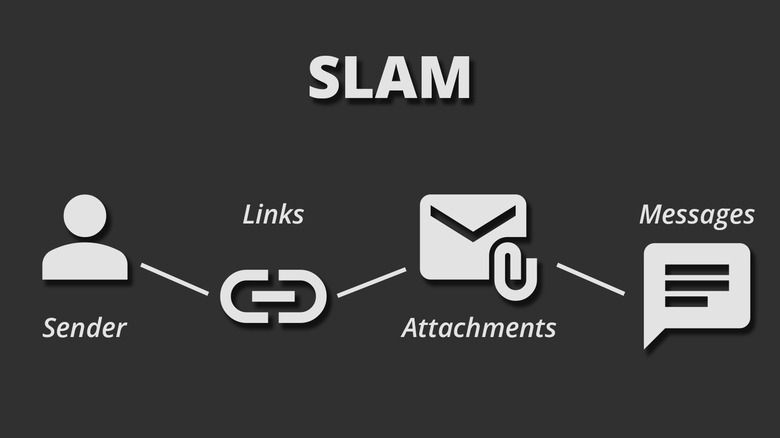
With phishing, cyber criminals send fraudulent emails or messages to users, and these victims, who often don’t know any better, end up clicking on malicious links or downloading attachments. An effective defense against falling victim to phishing attacks is adopting the SLAM method. It’s a quick, four-step checklist that encourages users to briefly pause and examine potentially dangerous emails or text messages. It’s an acronym that stands for Sender, Links, Attachments, and Messages — four variables to look out for in any new emails.

Using The SLAM Method

Breakdown of the SLAM acronym

The SLAM method advises all internet users to check for the following four key aspects in any suspicious emails or messages they receive:

  1. Sender: Carefully examine the sender’s email address or phone number, in the case of a text message. Look for spelling errors or cleverly masked domains. For example, an email from “xyz@apple.com” is legit, whereas one from “xyz@apple-support.com” should raise immediate suspicion. 
  2. Links: Many phishing attacks depend on the victim clicking on fraudulent links. Before you click on a link in an email, hover your cursor over it to preview the URL. Most browsers show the destination URL at the bottom of the screen, and you can also long-press on a mobile to view a preview of the webpage. This can help you identify scam websites that disguise themselves as legitimate login portals.
  3. Attachments: Only download attachments from trusted senders. With document-based malware, PDFs or Microsoft Office files are laced with malicious macros that execute when they are launched. 
  4. Messages: Sometimes carefully going through the contents of an email or a text message is enough to spot an attempted phishing attack. Look for inconsistencies in the font and color, in addition to poor grammar or spelling mistakes.

It only takes a few intentional applications of using the SLAM method before it develops into habitual instinct. Not to mention, it’s a fast and effective measure against phishing attacks that doesn’t require any fancy apps or browser extensions.

What To Do If You Receive A Phishing Email

The safest way to deal with a phishing email is by not interacting with any links or attachments it contains. If, after a quick SLAM analysis, you determine that an email you’ve received is potentially fraudulent, you should delete it. You can also report an email before you send it to the trash. Flagging a suspicious email will help train the systems of email providers, which eventually would reduce the likelihood of phishing emails landing in the inbox of users.

You can report an email for phishing on most major services like Gmail and Outlook. For example, on Gmail, click on the three-dotted menu icon located on top of the email message, and click the “Report phishing” button. You can also directly forward a suspected phishing email to reportphishing@apwg.org, which is an address that belongs to the Anti-Phishing Working Group of the FTC.

If you have unfortunately fallen prey to a phishing attack and have entered your credentials on a fake website, immediately change your passwords. Preventing hackers from easily accessing your accounts is also why you should always enable two-factor authentication.

If you are looking for an expert to help you find the best solutions for your business talk to GCInfotech about a free technology assessment

Published with consideration from Slashgear.com SOURCE

June 19, 2025/by John Murray
https://gcinfotech.com/wp-content/uploads/2025/06/June-19-25.png 200 200 John Murray http://gcinfotech.com/wp-content/uploads/2018/05/gcinfotech_logo_4501-l-300x91.jpg John Murray2025-06-19 09:14:142025-06-19 09:14:15SLAM Method: What It Stands For (And How It Can Save You From Hackers)

Categories

  • Business Operations (29)
  • Cloud Computing (11)
  • Data Protection (25)
  • Equipment (18)
  • Hedge Funds IT Services (1)
  • IT Solutions (5)
  • Law Firms IT (13)
  • Mobile Workforce (10)
  • Network Support (3)
  • News (2)
  • Office 365 (10)
  • Online Backup (1)
  • Security (50)
  • Website Development (5)

Archives

  • September 2026
  • August 2026
  • July 2026
  • May 2026
  • April 2026
  • March 2026
  • February 2026
  • January 2026
  • November 2025
  • October 2025
  • August 2025
  • June 2025
  • May 2025
  • April 2025
  • March 2025
  • February 2025
  • January 2025
  • December 2024
  • November 2024
  • October 2024
  • September 2024
  • August 2024
  • July 2024
  • June 2024
  • May 2024
  • April 2024
  • March 2024
  • February 2024
  • January 2024
  • December 2023
  • November 2023
  • October 2023
  • September 2023
  • August 2023
  • July 2023
  • June 2023
  • May 2023
  • April 2023
  • March 2023
  • February 2023
  • January 2023
  • December 2022
  • November 2022
  • October 2022
  • September 2022
  • August 2022
  • July 2022
  • May 2022
  • April 2022
  • March 2022
  • January 2022

Office Hours

Monday – Friday:

8:00 AM – 5:00 PM

Saturday – Sunday:

Closed

An Accredited Business

Click for the BBB Business Review of this Web Design in Stamford CT

GC Infotech LLC

2009 Summer St
Stamford, CT, United States

(203) 327 5700
info@gcinfotech.com

Categories

  • Business Operations
  • Cloud Computing
  • Data Protection
  • Equipment
  • Hedge Funds IT Services
  • IT Solutions
  • Law Firms IT
  • Mobile Workforce
  • Network Support
  • News
  • Office 365
  • Online Backup
  • Security
  • Website Development

Latest Posts

  • Essential VPN features to look forSeptember 11, 2026 - 1:44 pm
  • Elevating search rankings through smart image optimizationAugust 17, 2026 - 2:51 pm
  • Virtualization vs. cloud computing: What’s the real difference?July 15, 2026 - 10:46 am
© Copyright - GC Infotech - Enfold WordPress Theme by Kriesi
Scroll to top Scroll to top Scroll to top
  • Remote support

  • Pay a Bill

  • Call us 203-327-5700